Write
The child draws the number with a finger in the writing area.

 Learn to Multiply · A LuMarE app
A multiplication app for children aged 7–8, with handwritten answers, practice hints and challenges for revision. The girl in pink is there for each small step.
Android 8.0 or later · Spanish and English
Learn to Multiply is under review on Google Play. Downloads will be enabled once publication is approved.
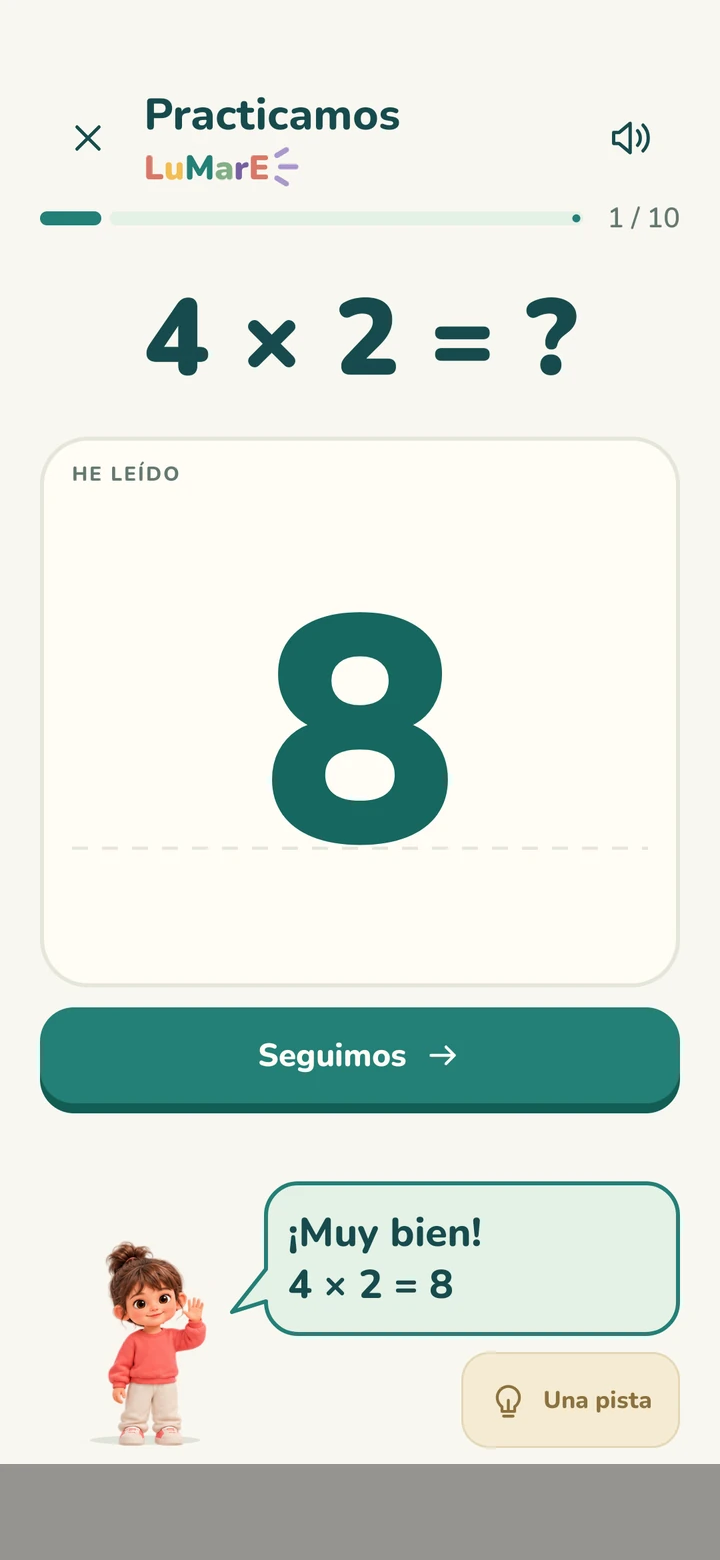
The answer is written on screen. Tap Done, and the app shows its reading and checks the multiplication in the same place.
The child draws the number with a finger in the writing area.
The strokes give way to the recognised number, which they can see before moving on.
A correct answer gets encouragement. After a mistake, practice mode offers a hint.
An illustrative example of the answer flow.
From a calm recap to working towards a goal. All four activities are also available with the free times tables.
Choose tables, write answers with a finger and use hints to keep trying.
Rounds of 5, 10 or 20 questionsA round to check what they have learned and see how it went afterwards.
20 questions per quizCorrect answers add 10 points; mistakes subtract 5. The score never goes below zero.
Goals of 50 or 100 pointsA challenge to see how many multiplications they can solve in the chosen time.
1 or 2 minutes of play
One step at a time. A hint when it helps.The girl offers text and animations. Sound effects can be turned on or off.
The sample never expires and does not limit rounds. Get to know the app before deciding whether to unlock the other tables.
Real practice, with no countdown and no usage limit.
Unlock the other tables and choose what to revise in each activity.
The unlock price is shown before purchase in the grown-ups section. There is no automatic renewal.
Children focus on multiplication. Grown-ups have a space to adjust the experience, manage the purchase and choose whether to share usage statistics or diagnostics.
The girl in pink offers messages, practice hints and small celebrations.
Usage statistics and diagnostics are optional, with independent choices on the grown-ups screen.
Change the name, turn sounds on or off and reset learning progress from the grown-ups area.
Useful details about the app, handwriting recognition and the purchase.
It is designed especially for children aged 7–8 who are starting to learn multiplication tables. Age is a guide: table selection and levels let you adapt practice to what each child already knows.
The child writes a number with a finger and taps Done. The app shows the number it interpreted and checks the multiplication, without an extra confirmation step. If a drawing is not understood, it can be erased or undone and written again.
The 2 and 5 times tables, with no expiry or limit on rounds. It includes practice, 20-question quizzes, both challenges, handwriting recognition, practice hints and saved progress.
A one-time in-app purchase unlocks the 1–9 times tables and all levels. The price is shown before purchase in Grown-ups → Full version. Sample progress is kept. There is no subscription or automatic renewal.
No. Learn to Multiply has no ads in either the free sample or the full version.
Yes. The app is designed for Android phones and tablets in portrait and landscape. It requires Android 8.0 or later. It is not an iPhone or iPad app.
Initial preparation downloads the recognition model and needs a connection. Once prepared, handwriting recognition runs on the device. Google Play needs a connection for purchases and restoration; authorised usage statistics and diagnostics also use the Internet.
Recognition is designed for numerical answers, not free text. How clearly a number is drawn can affect its reading. The app displays the interpreted number and allows another attempt when it cannot read the drawing. We do not promise 100% accuracy for every stroke.
The name is optional, and the profile and progress are stored locally. Our own analytics events do not send names, drawings or individual answers. Android may manage backups according to device settings. See Privacy for details.
Grown-ups includes purchase restoration, name and sound settings, and reset. Restoration checks your Google Play purchase; use the account that made the purchase. Resetting learning data does not turn the purchase into a new subscription.
Discover how Learn to Multiply works while Google Play reviews the app.